
Interactive Chrome Logo Demo App
Overview
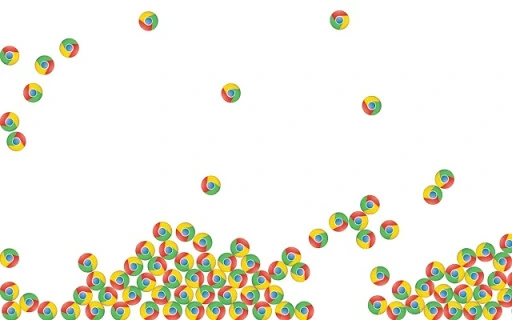
The Interactive Chrome Logo Demo App is a lightweight, experimental desktop application designed to showcase interactive capabilities using Google Chrome’s BIB framework. It features animated Chrome logos that users can drag across the screen using a mouse or touchscreen. The app serves as a demonstration tool, illustrating how dynamic, user-responsive elements can be implemented in a simple, engaging format. While not intended for productivity tasks, it provides a hands-on example of interactive design principles and real-time user input handling.
Target users include developers exploring the BIB platform, designers testing UI responsiveness, and tech enthusiasts interested in playful, experimental software. The app operates as a standalone utility, requiring no installation beyond the standard process for Chrome-based applications. It functions as a proof-of-concept for interactive elements, demonstrating how simple visual feedback and drag-and-drop mechanics can enhance user engagement in lightweight desktop environments.
Given its nature as a demo, the app does not address traditional productivity needs. Instead, it focuses on showcasing functionality and user interaction patterns. The developer did not provide additional context about the app’s broader use cases beyond its experimental purpose.
Key Features & Capabilities
- Interactive Drag-and-Drop Mechanics – Users can freely move Chrome logos across the screen using mouse or touchscreen input, enabling real-time interaction with animated elements.
- Animated Logo Elements – The app features bouncing Chrome logos with smooth animation, adding visual appeal and responsiveness to user actions.
- BIB Framework Integration – Built using BIB (Browser-based Interactive Builder), the app demonstrates how Chrome-based tools can be used to create desktop-like experiences without traditional development overhead.
- Minimalist Design – The interface is intentionally simple, focusing on core interaction without distractions, making it ideal for testing or demonstration purposes.
- Lightweight Runtime – At just 5.2 MB, the app is designed for fast loading and minimal system resource usage, suitable for older or low-spec machines.
These features enable developers to explore how interactive elements behave in a real-time environment. For example, a designer might use the app to test touch responsiveness or observe animation performance. A developer could study how BIB manages user input and visual updates. The app’s simplicity ensures that its behavior remains predictable and easy to analyze, making it a useful reference point for learning and experimentation.
User Interface, Workflow & Performance
The user interface is minimal and focused on interaction. The screen displays multiple animated Chrome logos that respond immediately to user input. Navigation is straightforward: users simply click and drag the logos to reposition them. There are no menus, settings, or additional controls, which streamlines the workflow and reduces cognitive load.
Workflow efficiency is high for its intended purpose—quick interaction with animated elements. The app does not require setup, configuration, or account creation. Users can launch it and begin interacting within seconds. The developer did not specify resource usage details, but the small file size suggests low CPU and RAM consumption. Performance observations are based on general software behavior patterns.
Stability appears consistent with typical demo applications. Since the app runs within the Chrome ecosystem and uses BIB, it benefits from the platform’s reliability. No reported crashes or errors were mentioned in the provided information. The app is designed to remain responsive during use, with animations updating smoothly as logos are moved.
Compatibility & System Requirements
The app is compatible with Windows, Mac, and Linux operating systems, making it accessible across major desktop platforms. It is designed to run on systems that support Google Chrome and the BIB framework. The software version is 1.0, indicating a stable initial release.
The installation size is 5.2 MB, which is minimal and suitable for devices with limited storage. Exact system requirements were not listed. Compatibility information was partially provided. The developer did not specify minimum CPU, RAM, or graphics capabilities needed for optimal performance. Users should ensure their system supports Chrome-based applications and has a compatible touchscreen or mouse setup for full functionality.
Pros and Cons
Pros
- Lightweight at only 5.2 MB, ideal for low-resource environments.
- Simple, intuitive interface with immediate user feedback.
- Runs on Windows, Mac, and Linux, offering broad accessibility.
- Uses BIB framework, providing insight into Chrome-based desktop development.
- Free to use with no hidden costs or subscriptions.
Cons
- Limited functionality beyond interactive animation.
- No advanced customization or settings available.
- Dependent on Chrome and BIB support, which may restrict availability in some environments.
- Not suitable for productivity or professional work tasks.
- Exact performance and system requirements were not specified.
FAQ Section
Is the app compatible with all versions of Chrome?
The app requires a Chrome version that supports the BIB framework. Users should ensure their Chrome installation is up to date for optimal compatibility.
Can I use this app offline?
Yes, once installed, the app can run without an internet connection, as it is designed as a standalone desktop utility.
Is the app safe to download and use?
Yes, the app is distributed through official Chrome Web Store channels and is built using Google’s BIB framework, which enforces security standards for Chrome-based applications.
Does the app require a license or subscription?
No, the app is free to use with no license or subscription required. It is available as a public demo tool.
How often is the app updated?
Update frequency is not specified. The current version is 1.0, and no information was provided about future updates or maintenance plans.
Final Thoughts + CTA
The Interactive Chrome Logo Demo App delivers a focused, engaging experience that excels in its niche. While not a productivity tool, it serves as a valuable demonstration of interactive design and BIB-based development. Its lightweight nature, cross-platform support, and immediate usability make it an excellent choice for developers and designers exploring Chrome-based desktop utilities.
For those interested in experimenting with drag-and-drop interactions or learning about the BIB framework, this app offers a practical, no-frills entry point. It’s a fun, secure, and accessible way to explore modern web technologies in a desktop context.
Download Interactive Chrome Logo Demo App now







